CopilotKit: The Top SDK for Building Full-Stack AI Agents, Generative UI, and Chat Applications
CopilotKit: The Top SDK for Building Full-Stack AI Agents, Generative UI, and Chat Applications

Background Overview
CopilotKit is an open-source framework specifically designed for building AI Copilot and Agent-native applications, with over 28.9k stars on GitHub and adopted by more than 100,000 developers. The core value of this framework lies in the deep integration of AI agents with user interfaces, enabling agents to control the UI in real-time, convey contextual information, and dynamically render interface components through generative UI.
Core Findings
1. Architecture Design and Core Features
CopilotKit adopts a three-layer architecture design, including the front-end component layer, CopilotRuntime runtime layer, and agent connection layer.
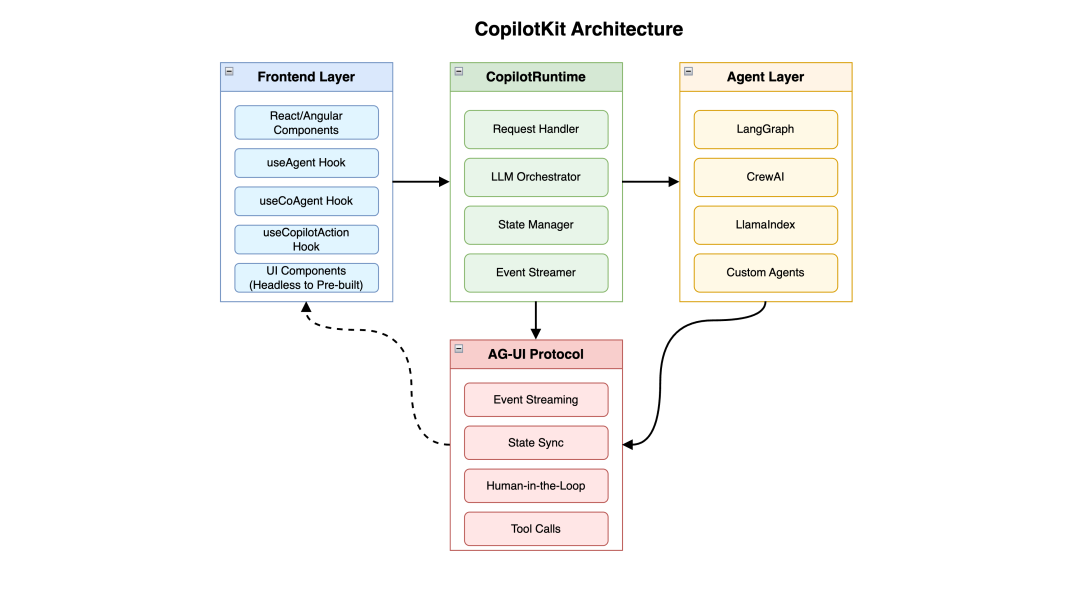 The front-end component layer provides a complete spectrum from fully headless UI to pre-built customizable components, allowing developers to choose flexibly according to their needs. CopilotRuntime serves as the backend orchestration engine, responsible for handling requests from the front-end client, managing LLM calls, and agent interactions. The agent connection layer connects any agent framework through the AG-UI protocol, including LangGraph, CrewAI, LlamaIndex, and more.
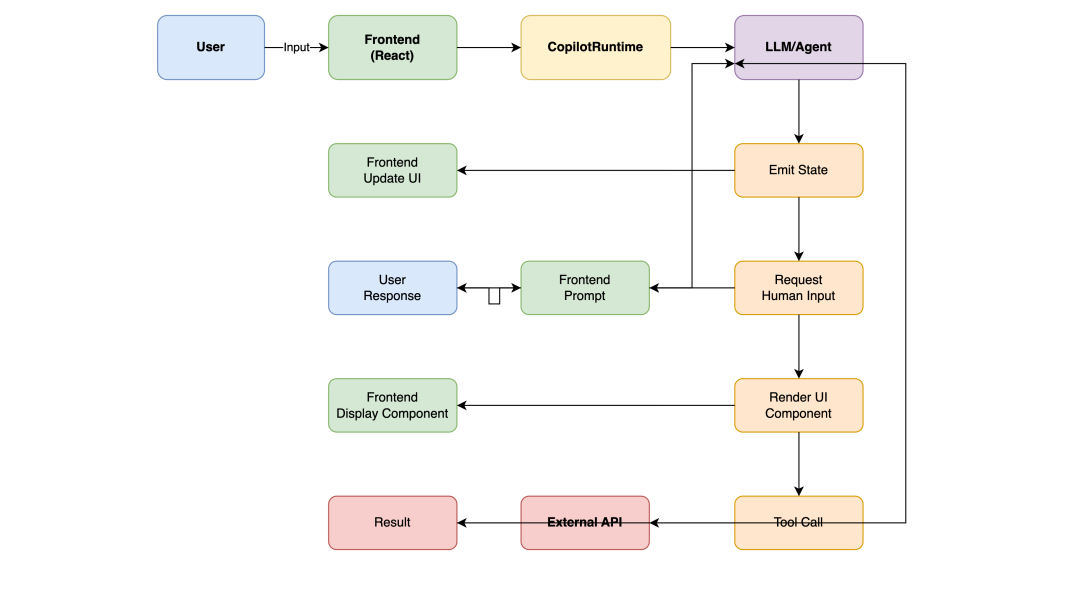
The core features of CopilotKit include Generative UI, which allows agents to dynamically render UI components at runtime; Shared State, enabling bidirectional state synchronization between the front end and agents; and Human-in-the-Loop, supporting agents in requesting human input or approval during execution. These features make it possible to build truly interactive AI applications, rather than just simple Q&A systems.
Workflow Illustration:
2. AG-UI Protocol: The Cornerstone of the Ecosystem
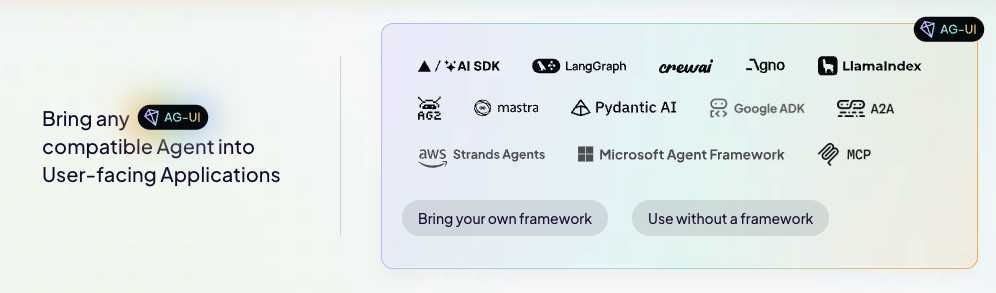
AG-UI (Agent-User Interaction Protocol) is an open, lightweight, event-driven protocol standard introduced by the CopilotKit team, aimed at standardizing the communication method between AI agents and user-facing applications. This protocol has been widely adopted by mainstream vendors and frameworks such as Google, Microsoft, AWS, LangChain, Mastra, Pydantic AI, forming an increasingly robust ecosystem.
The AG-UI protocol addresses a key issue: traditional front-end and back-end communication models (request-response) cannot meet the complex needs of agent applications. Agents require real-time streaming of state updates, handling interruptions and approval processes, and synchronizing UI with agent states, all of which necessitate a more flexible communication mechanism. AG-UI achieves these functionalities through event streaming, supporting real-time text streams, tool calls, state synchronization, and custom events.
Currently, the field of agent protocols presents a tri-pillar structure: AG-UI focuses on the interaction layer between agents and users, MCP (Model Context Protocol) is responsible for connecting agents with tools and data, while A2A (Agent-to-Agent) handles coordination communication between agents. Notably, AG-UI has achieved handshake integration with the A2A protocol and fully supports Google's A2UI specification for generative UI rendering.
3. Integration with Mainstream Frameworks
The integration of CopilotKit and LangGraph is one of the most mature use cases. With simple configuration, developers can connect the LangGraph agent to the CopilotKit frontend, achieving state sharing and real-time streaming responses. The integration process typically involves using the useCoAgent hook to connect the agent, emitting state updates from the agent side using the copilotkitemitstate function, and defining human-machine collaboration breakpoints using useCopilotAction.
For CrewAI developers, CopilotKit also provides an out-of-the-box integration solution. Through the AG-UI protocol, developers can expose any CrewAI agent as a frontend application that supports real-time interaction. In addition to LangGraph and CrewAI, the AG-UI protocol also supports numerous frameworks such as Microsoft Agent Framework, Google ADK, AWS Strands Agents, Mastra, Pydantic AI, Agno, LlamaIndex, etc., forming true multi-framework interoperability.
4. Comparative Analysis with Similar Frameworks
Compared to Vercel AI SDK, CopilotKit's positioning is significantly different. Vercel AI SDK mainly focuses on simplifying the streaming text transmission of chat interfaces, providing excellent useChat hook and UI components; while CopilotKit emphasizes deep agent integration, generative UI, and human-machine collaboration capabilities.
The relationship with LangChain is more complementary than competitive. LangChain focuses on building the "brain" (logic and workflows) of the agent, while CopilotKit provides the "face, voice, and hands" of that brain—namely, the interface for interacting with applications. Developers typically use LangChain/LangGraph to define agent logic and then build the user interaction layer through CopilotKit.
5. Typical Application Scenarios
Typical use cases of CopilotKit cover multiple fields. SaaS Copilot is its most common application scenario, where intelligent assistants can guide users through complex workflows, providing context-aware assistance. Co-creation Copilot emphasizes human-machine collaboration, where AI and users jointly create content, significantly enhancing productivity. Conversational Form Filling transforms cumbersome forms into natural conversational interactions, allowing users to complete complex data input through chat. Research Agent Applications such as the officially demonstrated research canvas application showcase how to deeply integrate LangGraph agents with the frontend, achieving a complete process of research outline generation, chapter writing, and human approval.
Quick Start: Code Example
Basic Integration Example
Below is a minimal runnable example of integrating CopilotKit with LangGraph:
Frontend (Next.js/React):
// app/page.tsx "use client"; import { CopilotKit } from "@copilotkit/react-core"; import { CopilotPopup } from "@copilotkit/react-ui"; import "@copilotkit/react-ui/styles.css";
export default function Home() { return (
Research Assistant
); }Runtime API Route:
// app/api/copilotkit/route.ts import { CopilotRuntime, OpenAIAdapter } from "@copilotkit/runtime"; import { NextRequest } from "next/server";const copilotKit = new CopilotRuntime({ remoteEndpoints: [ { url: process.env.LANGGRAPHURL || "http://localhost:8000" }, ], });
const serviceAdapter = new OpenAIAdapter();
export const POST = async (req: NextRequest) => { const { handleRequest } = copilotKit; return handleRequest(req, { serviceAdapter }); };
Shared State Example
// Use useCoAgent to implement front-end and back-end state synchronization import { useCoAgent } from "@copilotkit/react-core";
function ResearchCanvas() { const { state, setState } = useCoAgent({ name: "researchagent", initialState: { topic: "", outline: [], currentSection: null, }, });
return (
setState({ ...state, topic: e.target.value })} placeholder="Enter research topic" />
); }
Human-in-the-Loop Example
import { useCopilotAction } from "@copilotkit/react-core";
function DocumentEditor() { useCopilotAction({ name: "publishDocument", description: "User confirmation is required before publishing the document", parameters: [ { name: "title", type: "string", description: "Document title" }, { name: "content", type: "string", description: "Document content" }, ], handler: async ({ title, content }) => { const confirmed = await new Promise((resolve) => { showConfirmDialog({ title, content, onConfirm: resolve }); });
if (confirmed) { await api.publish({ title, content }); return "Document has been successfully published"; } return "Publishing has been canceled"; }, });
return ...; }`
Typical Application Cases
Case 1: SaaS Intelligent Assistant
Scenario: An enterprise-level project management tool that integrates an AI assistant to help users quickly create tasks, allocate resources, and generate reports.
Implementation Points:
- Use CopilotKit's shared state feature to allow AI to understand the current project view in real-time
- Dynamically render task cards, Gantt charts, and other components through generative UI
- Human-machine collaboration nodes ensure that critical operations (such as deleting a project) require user confirmation.Effect: Users can complete complex operations through natural language, such as "Help me assign the tasks due next week to the frontend team and generate a progress report."
Case 2: AI Research Assistant
Scenario: An academic research assistance tool that helps researchers collect information, organize paper structure, and collaborate on writing.
Implementation Highlights:
- LangGraph agent is responsible for information retrieval and logical reasoning.
- CopilotKit frontend displays the research outline and literature list.
- State synchronization ensures that research progress is saved and displayed in real-time.
- Approval nodes prompt users for confirmation when referencing external materials.
Case 3: Intelligent Form Filling
Scenario: Transforming complex insurance application forms into conversational interactions.
Implementation Highlights:
- The agent dynamically decides the next question based on user responses.
- Conditional rendering is used to display different UI components based on context.
- Automatically saves partially completed forms, supporting resumption from breakpoints.
- Summarizes all information for user confirmation before submission.
Technical Insights
The technical implementation of CopilotKit is based on modern web stacks. The frontend uses React (also supports Angular) as the main UI framework, providing hooks like useAgent and useCoAgent for state management and agent interaction. The backend runs the CopilotRuntime class as a central orchestrator, handling request validation, LLM calls, and response streaming. The communication protocol uses Server-Sent Events (SSE) for real-time stream pushing from server to client, while HTTP POST handles client requests.
Version 1.50 brings significant architectural upgrades, introducing a clearer single endpoint architecture, better observability (with telemetry built-in), and deep integration with CopilotKit Next, further simplifying the development experience.



