Claude Code + Apify, Accessible Data Scraping Across the Web
Claude Code + Apify, Accessible Data Scraping Across the Web
 Hello everyone, I am Lu Gong.
When using Claude Code, especially in Plan mode, there is often a need to use the WebSearch tool to scrape web data. However, it is common to encounter Fetch errors.
This has actually been an old problem. The built-in WebFetch and WebSearch tools in Claude Code are sufficient for 80% of scenarios when researching and gathering information, but they struggle when dealing with JS-rendered pages, sites that require login, or large-scale data collection needs.
A couple of days ago, I saw Santiago (@svpino, a well-known blogger in the AI/ML field) share a solution. He mentioned that you can use Claude Code to pull real-time structured data from any website, returning it in a usable table format, not just a long text summary. I tried it out, and it works really well.
Today, I will discuss how to equip Claude Code with the capability to collect data from across the web, offering two paths to choose from based on your needs.
Limitations of Claude Code's Built-in Networking Tools
Claude Code comes with two networking tools: WebSearch for searching and WebFetch for scraping page content.
WebSearch is relatively simple; you provide it with a search term, and it returns relevant links and titles. WebFetch is a bit more complex; you give it a URL and a question, and it scrapes the page content, converting HTML to Markdown using the Turndown library, truncating it to within 100KB, and then summarizing it with a lightweight model (Haiku).
In simple terms, these two tools are like a basic version of a browser. They work, but they have several significant flaws.
The biggest issue is that they cannot render JS. Many websites today are SPAs (Single Page Applications), with content dynamically loaded via JS. For sites like X/Twitter, many e-commerce platforms, and various SaaS backends, WebFetch cannot capture the actual content, only retrieving an empty shell.
Their anti-scraping capabilities are also virtually non-existent. They do not support proxy rotation and cannot handle CAPTCHA verification, so when encountering websites with anti-scraping mechanisms, they simply fail.
Another pain point is that they only return text summaries. If you want to obtain structured data (like product price lists, user comment lists, or competitive feature comparisons), WebFetch cannot do that; it always gives you a compressed text segment.
These three shortcomings combined make Claude Code lack usability in data collection. But now there is a solution.
Method 1: Apify Agent Skills
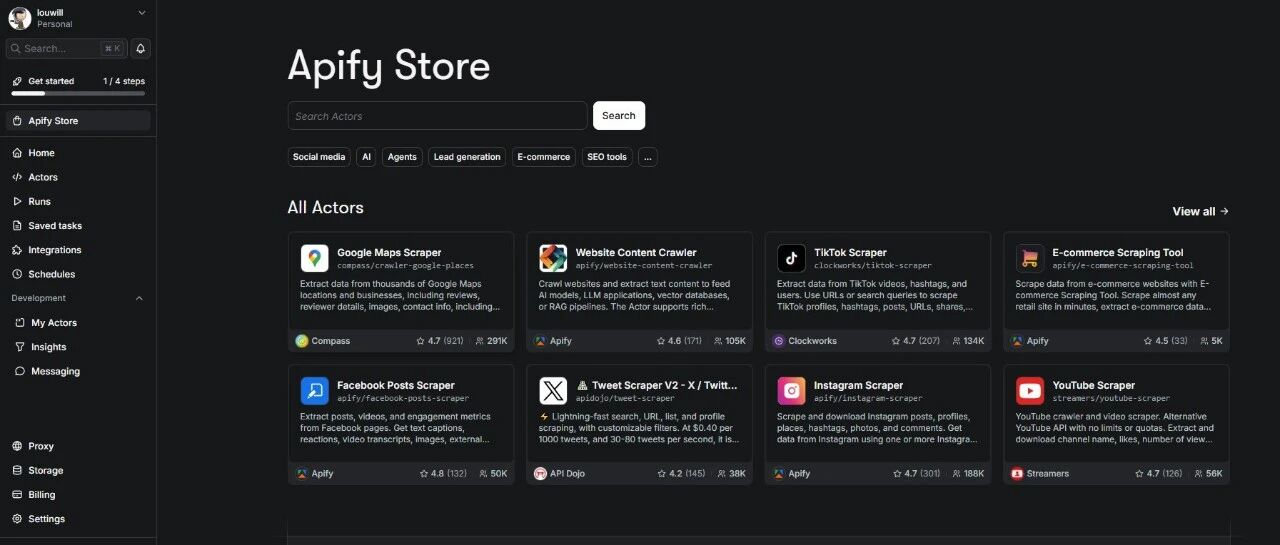
Apify is a well-established cloud scraping platform that has been doing web scraping and automation for many years. Recently, they launched a set of Agent Skills, which are essentially a collection of pre-made skill packages designed to teach AI Coding Agents how to perform data collection.
GitHub repository address: https://github.com/apify/agent-skills
This set of Skills supports mainstream AI programming tools like Claude Code, Cursor, Codex, and Gemini CLI. Currently, there are a total of 12 skills that cover a wide range of applications.
The core apify-ultimate-scraper is a universal scraping skill that can collect data from platforms like Instagram, Facebook, TikTok, YouTube, Google Maps, and Google Search. The key is that it returns structured data, which can be directly exported as CSV or JSON, ready to use.
Other skills cover scenarios such as competitive analysis, brand reputation monitoring, e-commerce data collection, KOL discovery, lead generation, and trend analysis. If you are involved in market research or business data analysis, this set is simply amazing.
Installing this set of Skills in Claude Code is also very convenient. The prerequisite is to have an Apify account (register at apify.com, there is a free quota), and once you obtain the API Token, you can start configuring.
Installation consists of two steps. First, add the market source:/plugin marketplace add https://github.com/apify/agent-skills to install the skills you need, such as the ultimate scraper:
/plugin install apify-ultimate-scraper@apify-agent-skills You can also use the general npx method to install all skills at once:
npx skills add apify/agent-skills After installation, don't forget to configure your API Token in the .env file at the root of your project:
APIFYTOKEN=yourtoken
For example, scraping YouTube video data
Here’s a key point. Santiago repeatedly emphasizes in his tweets that the core advantage of this solution is returning structured data. For example, if you ask Claude Code to scrape a product list from an e-commerce platform, you will receive a well-organized table (product name, price, rating, link) that can be directly used for analysis, which is much more practical than the text summary returned by WebFetch.
Apify's billing model is pay-per-result, meaning you only get charged when data is successfully scraped. However, for individual users, the free quota is sufficient for many tasks.
Method Two: Apify MCP Server
If you want more flexible control, or if your scenario is not covered by Skills, there is a second option: directly connect to the Apify platform via MCP (Model Context Protocol).
With the Apify MCP Server, Claude Code can directly call thousands of ready-made crawlers and automation tools in the Apify Store.
GitHub repository address: https://github.com/apify/apify-mcp-server
The MCP solution configuration is also not complicated. It is recommended to use a hosted remote server for the easiest configuration. Add the following to your MCP configuration file:
{ "mcpServers": { "apify": { "url": "https://mcp.apify.com", "headers": { "Authorization": "Bearer yourAPIFYTOKEN" } } } } If you prefer to run it locally, you can use the Stdio method:
{ "mcpServers": { "apify-mcp": { "command": "npx", "args": ["-y", "@apify/actors-mcp-server"], "env": { "APIFYTOKEN": "yourAPIFY_TOKEN" } } } } After configuration, Claude Code will be able to call tools like search-actors (search for available crawlers), call-actor (execute crawler tasks), get-dataset-items (retrieve scraping results), etc.
Both Skills and MCP methods can be installed; they can complement each other.
If your needs are high-frequency and fixed scenarios (like scraping competitor prices daily), using Skills is more convenient, as the pre-made workflows are ready to use.
If your needs are temporary and variable (like scraping social media today and government open data tomorrow), using MCP is more flexible, as there are over 15,000 Actors available in the Apify Store that can be called at any time.
The prerequisite for both methods is the same: you need an Apify account and API Token, and a Node.js 20.6+ environment.
Be sure to note a timeline: the SSE transmission method of Apify MCP Server will be deprecated on April 1, 2026, at which point you will need to update to the Streamable HTTP method. If you are configuring now, just use the recommended configuration above, as it is already the new method.
Other Solutions Worth NotingBeyond Apify, there are several MCP search solutions worth understanding.
Brave Search MCP is the search solution officially recommended by Anthropic, offering 2000 free queries per month, suitable for daily search supplementation, but it is just a search engine and cannot perform structured data collection.
Playwright MCP can perform true browser rendering and handle JavaScript dynamic pages, making it suitable for those heavily JavaScript-based sites that WebFetch cannot manage. However, it leans more towards automation and is not as convenient as Apify for large-scale data collection.
Bright Data MCP follows an enterprise-level approach, supporting proxy rotation and CAPTCHA handling, and in 2026, it introduced a new free tier (5000 MCP requests per month), suitable for scenarios that need to bypass anti-scraping mechanisms.
These solutions each have their strengths and can be combined as needed. My current combination includes built-in WebFetch/WebSearch for daily research needs, and Apify Skills for structured data collection.
Claude Code's networking capabilities and built-in tools can cover 80% of daily scenarios, but that remaining 20% (JS rendering, anti-scraping, structured data) is precisely what cannot be avoided in many practical tasks. Apify's Agent Skills and MCP Server fill this gap, and the configuration process is not complicated. I highly recommend students with data collection needs to give it a try.



